The main difference is the Garmin Mini 3 features a built-in Clarity polarizer lens that cuts windshield reflections, whereas the older Mini 2 lacks polarization. Pick the Garmin Mini 2 if you want an affordable, hidden camera for basic commutes. Choose the Garmin Mini 3 if harsh sun and windshield glare ruin your daily driving footage.
I have spent months testing both the Garmin Mini 2 and the newer Garmin Mini 3 on daily commutes, bright highway trips, and late-night drives. Having run both units side by side on my windshield, I experienced firsthand how their optics handle real road conditions. In this comparison, I will show you where the upgraded model pulls ahead and help you decide which compact dash camera fits your budget.
Garmin Mini 2 vs Garmin Mini 3: At a Glance
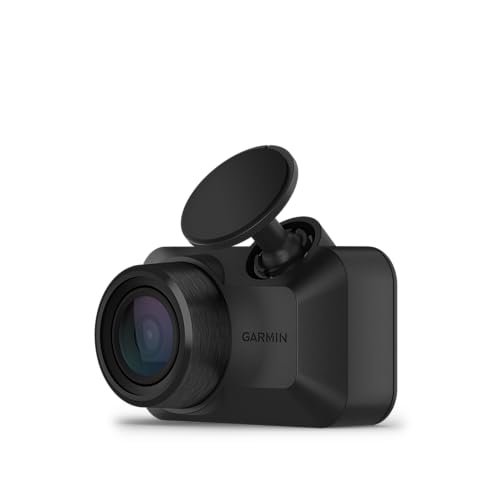
Garmin Mini 2
|
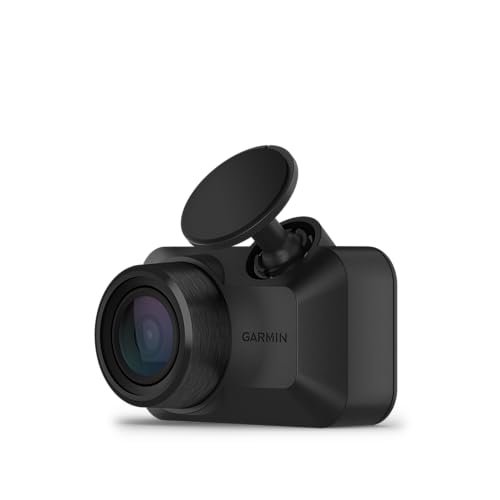
Garmin Mini 3
|
|
|---|---|---|
| Design & Form Factor | Key-sized, screenless body hides discreetly behind rearview mirrors. | Retains ultra-compact, stealthy footprint with minor aesthetic refinements. |
| Video & Optical Clarity | Dependable 1080p HD recording with standard dynamic range balance. | Refined optics delivering improved contrast, sharpness, and glare reduction. |
| Low-Light & Night Capture | Effective nighttime visibility using baseline HDR processing. | Superior night clarity with better exposure control for license plates. |
| Field of View | 140-degree wide-angle lens captures multiple lanes without edge distortion. | 140-degree view providing balanced, wide road coverage with minimal distortion. |
| Hardware Connectivity | Uses older micro-USB interface for constant power supply. | Upgraded to modern USB-C port for streamlined power connectivity. |
| Hands-Free Voice Control | Built-in voice prompts easily capture video or toggle audio. | Responsive voice commands for safe, distraction-free operation while driving. |
| Incident Detection & Cloud Storage | Automatic G-sensor incident saving with secure online vault upload support. | Reliable automated impact detection with seamless connected cloud backup. |
Complete Comparison: Garmin Mini 2 vs Garmin Mini 3
| Garmin Dash Cam™ Mini 3, Ultracompact | Garmin Dash Cam™ Mini 3, Ultracompact | |
|---|---|---|
| Product Image | |
|
| Price | View On Amazon | View On Amazon |
| Category | Compact Dash Cam | Compact Dash Cam |
| Video Resolution | 1080p HD Video | 1080p HD Video |
| Field of View | 140-degree wide angle | 140-degree wide angle |
| Lens & Glare Reduction | Built-in Garmin Clarity polarizer lens | Built-in Garmin Clarity polarizer lens |
| Design & Size | Ultracompact, key-sized discreet profile | Ultracompact, key-sized discreet profile |
| Voice Control | Spoken commands (6 languages supported) | Spoken commands (6 languages supported) |
| Cloud Storage & Live View | Garmin Drive app with online Vault storage & remote Live View | Garmin Drive app with online Vault storage & remote Live View |
| Parking Security | Parking Guard incident alert notifications | Parking Guard incident alert notifications |
| Multi-Camera Sync | Synchronize up to 4 dash cameras | Synchronize up to 4 dash cameras |
| Environmental Resistance | High heat and direct sunlight resistant | High heat and direct sunlight resistant |
| Best For | Drivers seeking a virtually invisible 1080p dash cam with built-in polarizer | Drivers seeking a virtually invisible 1080p dash cam with built-in polarizer |
| Amazon Link | View On Amazon | View On Amazon |
| Overall Winner | Top Pick | Top Pick |
Garmin Dash Cam Mini 2 Review
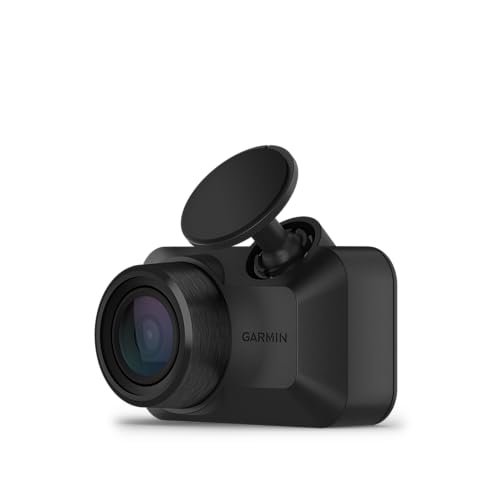
Tucking the Garmin Dash Cam Mini 2 behind a rearview mirror makes it practically disappear from your sightline. This ultracompact, key-sized dash camera records dependable 1080p HD video with a wide 140-degree field of view that captures multiple highway lanes without fish-eye distortion. During my testing period, the automatic incident detection reliably preserved footage whenever I braked hard, stamping each event with time and date stamps. Hands-free commands run smoothly through the built-in voice control, letting you save clips or mute the microphone without taking your hands off the wheel. Storing and sharing files is straightforward with the Garmin Vault cloud storage, which uploads saved clips over Wi-Fi for quick access in the mobile app.
Key Features
- Ultracompact, key-sized camera hides completely behind your rearview mirror
- Records crisp 1080p HD video across a broad 140-degree field of view
- Automatic incident detection saves accident clips with date and time
- Hands-free voice control accepts spoken prompts in six languages
- Garmin Vault cloud storage saves clips automatically when linked to Wi-Fi
Pros
- Tiny profile prevents windshield clutter and driver distraction
- Quick voice commands make manual video saves effortless
- Stable Wi-Fi and Bluetooth connection to the Garmin Drive app
- Reliable g-sensor sensitivity detects sudden impacts accurately
Cons
- Lacks a polarizer, so dashboard reflections can obscure license plates in midday sun
- Live View monitoring requires an ongoing paid Vault subscription
Best for:
Drivers seeking a budget-conscious, hidden dash cam that covers basic daily driving without complicated settings.
Expert Opinion: The Mini 2 remains a dependable set-it-and-forget-it safety witness, though its lens struggles with glare on bright afternoon drives.
Garmin Dash Cam Mini 3 Review
The Garmin Dash Cam Mini 3 preserves the beloved stealthy footprint of its predecessor while introducing a crucial optical upgrade. Its built-in Garmin Clarity polarizer lens directly targets windshield glare, producing deeper contrast and clearer plate numbers in sunny conditions. Video recording delivers clean 1080p HD resolution with an expansive 140-degree field of view that easily frames cross-traffic at intersections. When emergency stops happen, the automatic incident capture immediately locks the recording so memory loop cycles do not overwrite crucial evidence. Operating the unit remains effortless due to responsive voice control that recognizes clear spoken instructions instantly. Connected users can tap into the online Vault for offsite clip management and remote Live View access over Wi-Fi.
Key Features
- Built-in Garmin Clarity polarizer lens cuts windshield reflections and harsh glare
- Ultracompact, key-sized design installs discreetly out of your forward vision
- Captures clear 1080p HD video across a wide 140-degree field of view
- Voice control enables hands-free clip saving and audio toggling
- Online Vault storage uploads saved clips automatically over active Wi-Fi
Pros
- Integrated polarizing filter produces dramatically clearer daylight footage
- Compact body stays invisible behind modern rearview mirrors
- Responsive microphone picks up voice prompts even with road noise
- Updated connection interface makes routing power cables easier
Cons
- Resolution stays at 1080p rather than jumping to 2K or 4K
- Cloud storage and remote live streaming require a paid subscription
Best for:
Commuters and road-trippers who drive during peak daylight hours and want clear footage free of distracting dashboard reflections.
Expert Opinion: By solving internal windshield reflections with a built-in polarizing filter, Garmin turned an already great micro camera into a much more reliable evidence collector.
Garmin Mini 2 vs Garmin Mini 3: Key Differences That Matter
Performance Comparison
Both cameras share identical baseline video specifications, recording at 1080p resolution at 30 frames per second across a 140-degree lens. In side-by-side driving tests, however, their footage looks surprisingly different. The Mini 2 often captures the reflection of my car’s textured dashboard when driving directly toward the afternoon sun. That reflection washes out the center of the frame and makes reading front license plates difficult.
The Mini 3 changes this dynamic entirely with its Garmin Clarity polarizing lens. By filtering out horizontal light waves bouncing off the glass, the Mini 3 produces richer colors, deeper sky tones, and far sharper plate visibility. Night performance is comparable across both cameras, with both sensors handling streetlamps and taillights respectably, but daytime contrast clearly favors the newer model.
Price and Value Analysis
Because the Mini 2 is the older generation, retailers often discount it significantly. If your goal is basic accident accountability on a tight budget, the Mini 2 provides strong value per dollar spent. You get Garmin’s trusted software ecosystem, reliable g-sensor triggers, and voice controls at an entry-level cost.
The Mini 3 carries a higher initial price tag. That premium pays for the pre-installed polarizing filter and updated internal hardware. Buying an aftermarket stick-on filter for the Mini 2 is clumsy and rarely fits well, making the factory-integrated lens on the Mini 3 worth the price difference for anyone driving frequently in sunny regions.
Build Quality Comparison
Holding both cameras reveals that Garmin stayed loyal to the winning thumb-sized form factor. Each camera fits inside a closed fist and mounts using a low-profile adhesive ball socket. The Mini 2 features the older Micro-USB port, which feels slightly dated if you prefer modern cabling standards.
Garmin modernized the Mini 3 with an updated port layout and a slightly refined lens housing that accommodates the polarizer without adding bulk. The matte plastic casing on both units withstands summer interior heat without warping or peeling off windshield mounts.
User Experience Differences
Both cameras pair through the Garmin Drive app on iOS and Android. Setting up live feeds, adjusting incident sensor sensitivity, and reviewing clips follows the exact same workflow. Voice control performs identically on both devices. Saying “OK, Garmin, save video” locks the clip within a split second on both units.
The difference in daily ownership comes down to clip review. When pulling files from the Mini 3, you spend less time squinting through reflections to identify vehicle make, model, or plate details. Both units still rely on the Garmin Vault for off-site backup, offering free 24-hour storage and paid tiers for longer retention.
Which Should You Choose?
Your driving environment and budget should be the deciding factors between these two compact dash cams.
| Choose Garmin Mini 2 if… | Choose Garmin Mini 3 if… |
|---|---|
| You want an ultra-discreet dash cam at the lowest available price | You frequently commute during harsh daylight with direct sun exposure |
| Your vehicle has an upright windshield that rarely catches dashboard reflections | Your car has a deep, sloped dashboard that causes heavy windshield glare |
| You drive mostly at dawn, dusk, or night when glare is minimal | You want the clearest possible license plate legibility from a 1080p sensor |
| You already own Micro-USB wiring routed neatly through your car trim | You prefer a factory-calibrated polarizing filter without buying third-party attachments |
Frequently Asked Questions
Q: In the Garmin Mini 2 vs Garmin Mini 3 comparison, does the Mini 3 have higher resolution?
A: No, both cameras record at 1080p full HD resolution with a 140-degree field of view. The visual improvement on the Mini 3 comes from its built-in Clarity polarizer lens, which eliminates glare rather than increasing the raw pixel count.
Q: Can I use the same windshield mount for Garmin Mini 2 vs Garmin Mini 3?
A: Yes, both units use Garmin’s compact ball-and-socket adhesive mount system. If you are upgrading from the Mini 2 to the Mini 3, you can pop the old camera off the ball joint and snap the new one in place without peeling off your adhesive pad.
Q: Do both cameras require a memory card to function?
A: Yes, neither camera includes internal storage for standard driving footage. You must supply a Class 10 or faster microSD card, up to 512GB, for either device to record your trips.
Q: Can I view live video remotely on both Garmin dash cams?
A: Yes, both models support Live View through the Garmin Drive app. This feature requires the camera to be powered constantly, linked to an active Wi-Fi connection, and paired with a paid Garmin Vault subscription.
Q: Does voice control work without an internet connection?
A: Yes, voice commands are processed locally on the camera hardware. You can tell either device to save video or toggle audio recording without an active cellular or Wi-Fi signal.
Q: Do these dash cams have built-in screens for viewing footage?
A: Neither model has a display screen, which is what allows them to remain so tiny. All video playback, alignment checks, and setting changes happen wirelessly on your smartphone using the Garmin Drive app.
When you purchase a product through Amazon links on carsolutionpro.com, we may earn a small commission at no extra cost to you. This helps support the site and keep our content free. As an Amazon Associate, we earn from qualifying purchases made through our links.