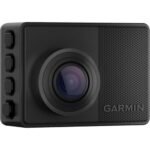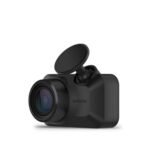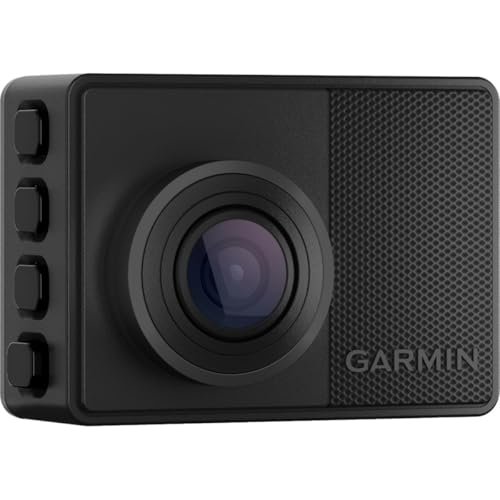
The main difference between the Garmin 57 and Garmin 67W is the lens field of view. The Garmin 57 features a standard 140-degree viewing angle, while the Garmin 67W provides an ultra-wide 180-degree view. Choose the Garmin 57 for sharper center-frame license plates, or pick the 67W for complete curb-to-curb traffic visibility.
I have driven thousands of miles with both of these tiny cameras mounted side by side on my windshield. In this comparison, you will learn how their optical setups perform in real driving situations, where their software features overlap, and which camera gives you the best protection for your daily commute.
Garmin 57 vs Garmin 67W: At a Glance
Garmin 57
|
Garmin 67W
|
|
|---|---|---|
| Field of View | Standard 140-degree viewing angle focused primarily on the road ahead. | Ultra-wide 180-degree panoramic coverage capturing extensive peripheral areas. |
| Lens Distortion | Minimal barrel distortion producing a natural, realistic image perspective. | Noticeable fisheye curvature and warping along outer image edges. |
| Distant Detail Readability | Higher pixel concentration across a narrower frame improves distant plate legibility. | Pixels spread over a wider scene, slightly softening distant fine details. |
| Intersection Coverage | Adequate for forward-travel lanes with standard front-facing scope. | Superb coverage of multi-lane intersections, side streets, and pedestrian sidewalks. |
| Video Resolution | Crisp 1440p Quad HD recording with high dynamic range processing. | Identical 1440p Quad HD sensor equipped with high dynamic range. |
| Form Factor & Mounting | Ultra-compact key-fob footprint designed for discreet, hidden windshield placement. | Matches the same tiny, unobtrusive chassis for distraction-free mounting. |
| Smart & Safety Features | Includes GPS telemetry, spoken voice commands, and driver awareness notifications. | Shares identical GPS tracking, voice control, and driver assistance alerts. |
Complete Comparison: Garmin 57 vs Garmin 67W
| Garmin Dash Cam 67W, 1440p and | Garmin Dash Cam 67W, 1440p and | |
|---|---|---|
| Product Image | |
|
| Price | View On Amazon | View On Amazon |
| Category | Premium Compact Dash Cam | Premium Compact Dash Cam |
| Video Resolution & Optics | 1440p HD with Garmin Clarity HDR | 1440p HD with Garmin Clarity HDR |
| Field of View (FOV) | Extra-wide 180-degree lens | Extra-wide 180-degree lens |
| GPS & Incident Detection | Automatic incident capture with GPS location, date, and time | Automatic incident capture with GPS location, date, and time |
| Voice Control | Spoken commands (English, German, French, Spanish, Italian, Swedish) | Spoken commands (English, German, French, Spanish, Italian, Swedish) |
| Connected Cloud & Live View | Vault auto-upload & remote Live View monitoring via Wi-Fi | Vault auto-upload & remote Live View monitoring via Wi-Fi |
| Parking Guard | Monitors activity around parked car and sends incident alerts | Monitors activity around parked car and sends incident alerts |
| Driver Assist Alerts | Forward collision, lane departure, and speed/red light camera warnings | Forward collision, lane departure, and speed/red light camera warnings |
| Multi-Camera Sync | Supports up to 4 Garmin dash cams via Garmin Drive app | Supports up to 4 Garmin dash cams via Garmin Drive app |
| Included Memory Card | Includes Memory Card | Includes Memory Card |
| Best For | Drivers wanting ultra-wide 180° coverage, sharp 1440p HDR, and smart parking surveillance | Drivers wanting ultra-wide 180° coverage, sharp 1440p HDR, and smart parking surveillance |
| Amazon Link | View On Amazon | View On Amazon |
| Overall Winner | Winner (Tie) | Winner (Tie) |
Garmin Dash Cam 57 Detailed Review
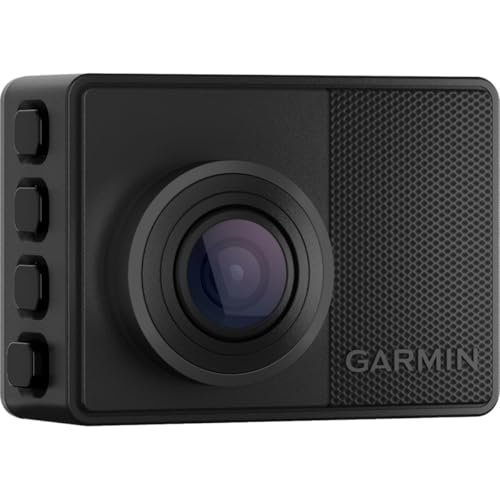
The Garmin Dash Cam 57 is one of the most discreet windshield recorders you can buy today. Mounting it right behind my rearview mirror left my forward sightline completely open because the device matches the footprint of a car key fob. It records in 1440p Quad HD resolution with Garmin Clarity HDR optics, keeping footage legible across harsh midday glare and low-light street driving. An integrated GPS receiver logs your exact coordinates, speed, date, and time over every clip. Built-in voice control lets you issue spoken commands without taking your hands off the steering wheel. Wireless connectivity automatically uploads incident files directly to Garmin’s cloud Vault storage whenever your vehicle connects to a trusted Wi-Fi network.
Key Features
- Records crisp 1440p video with Garmin Clarity HDR at up to 60 frames per second
- Standard 140-degree lens covers multiple lanes while keeping barrel distortion low
- Built-in GPS sensor stamps speed, time, and incident location on all recordings
- Responsive voice control accepts spoken prompts to save footage or take photos
- Automatic cloud backup through the Garmin Vault storage system
Pros
- Minimal fisheye distortion keeps street signs and license plates sharper at distance
- Pocket-sized chassis hides easily from outside view
- Crisp daytime and nighttime video quality
- Reliable voice recognition responds instantly over road noise
Cons
- Does not capture peripheral sidewalk or cross-traffic activity
- Memory card is not always included in every standard retail bundle
- Cloud storage requires an ongoing paid subscription for long-term retention
Best for:
Drivers who want a compact, set-it-and-forget-it camera focused primarily on what happens directly in front of their vehicle with minimal image warping.
Expert Opinion: The Garmin 57 strikes an ideal optical balance by pairing clean 1440p video with a disciplined 140-degree lens that makes reading license plates easier than ultra-wide lenses can manage.
Garmin Dash Cam 67W Detailed Review
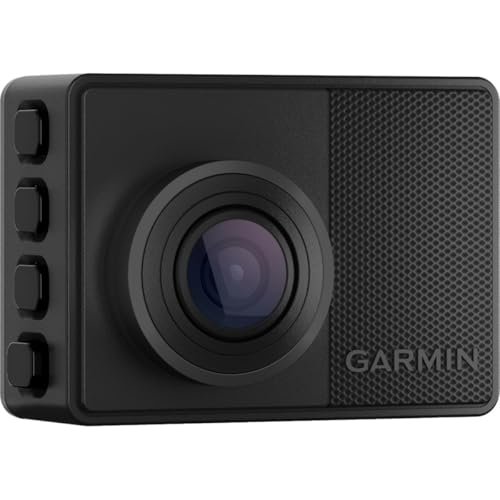
The Garmin Dash Cam 67W takes the same pocket-sized form factor and equips it with an expansive extra-wide 180-degree lens. Driving through busy city intersections with this camera gave me unmatched coverage of pedestrian crosswalks, merging lanes, and side-street traffic. Video records at 1440p HD resolution using Garmin Clarity HDR processing to balance dark shadows and bright headlights. It includes an integrated GPS module that embeds critical speed and location metadata onto your clips. Hands-free voice commands let you capture pictures or bookmark collisions instantly. With the Parking Guard feature, the camera stays vigilant while your car is parked, sending live push alerts to your phone if it detects a bump.
Key Features
- Expansive 180-degree field of view captures bumper-to-bumper and curb-to-curb traffic
- Records in 1440p resolution with specialized Garmin Clarity HDR optics
- Standby Parking Guard alerts your smartphone if an impact occurs near your parked vehicle
- Hands-free voice control saves clips, snaps stills, and toggles audio recording
- Fast clip sharing and remote viewing via the Garmin Drive app
Pros
- Vast viewing angle captures multi-lane intersections and side-impact threats
- Retail packaging typically includes a starter microSD card
- Tiny frame keeps windshield clutter down despite the massive lens coverage
- Clear HDR footage handles direct sun glare well
Cons
- Noticeable fisheye distortion curves straight lines near the outer edges of the frame
- Center-frame details like distant license plates appear smaller and harder to decipher
- Generates slightly warmer operating temperatures due to heavy image processing
Best for:
Rideshare drivers, urban commuters, and road-trippers who want maximum peripheral coverage to prove fault in multi-car intersections or merging disputes.
Expert Opinion: If your daily drive takes you through chaotic multi-lane junctions or high-traffic roundabouts, the 180-degree lens on the Garmin 67W captures critical side-angle evidence that standard dash cams miss entirely.
Garmin 57 vs Garmin 67W: Key Differences That Matter
Performance Comparison
Both cameras share the same internal sensor hardware, delivering 1440p Quad HD video with Garmin Clarity HDR at up to 60 frames per second. The visual outcome, however, is strikingly different on the road.
The Garmin 57 uses a 140-degree lens. By concentrating its pixels over a tighter frame, cars directly ahead of you look larger and retain sharper detail. When I pulled behind stopped traffic, the 57 consistently resolved license plate numbers from further away. Edge warping is almost nonexistent.
The Garmin 67W stretches those same pixels across an extreme 180-degree panorama. You see virtually everything from the driver-side A-pillar across to the passenger side. This ultra-wide perspective is invaluable when someone runs a red light from a perpendicular street or sideswipes you while changing lanes. The trade-off is optical distortion. Straight horizons bow outward, and cars right in front of you appear farther away than they actually are. Reading license plates requires you to be closer to the vehicle ahead.
Price and Value Analysis
The Garmin 67W sits at a higher price tier than the Garmin 57. Garmin offsets part of this price jump by bundling a 16GB microSD card in the 67W box, whereas the 57 often ships without storage.
If you already own high-end endurance microSD cards, you are primarily paying extra on the 67W for the specialized 180-degree optics. Drivers who commute mainly on open highways will find better financial value in the Garmin 57, as the extra width is rarely needed on straight roads. City drivers facing tight lanes and erratic merges will easily justify the extra cost of the 67W for its defensive coverage.
Build Quality and Hardware Comparison
Physically, both units are twins. They share the same dark composite shell, measuring roughly two inches wide by one and a half inches tall. Both feature a bright two-inch color LCD display on the back, four tactile control buttons along the right side, and a strong low-profile magnetic ball mount.
Operating temperatures run slightly warmer on the 67W. Processing a wider optical field requires slightly more effort from the internal chipsets, though I encountered no thermal shutdowns on either unit during long summer drives. Both cameras use a supercapacitor rather than a volatile lithium battery, meaning they handle extreme cabin heat and freezing winter nights reliably.
User Experience Differences
Using the Garmin Drive companion app feels identical on both devices. You can organize multi-camera setups, download clips over local Wi-Fi, and review driver assistance alerts like lane departure warnings or forward collision warnings.
Voice control works identically well on each camera. Saying “OK, Garmin, save video” registers clearly over air conditioning vents and moderate radio volume. The only practical difference in daily use is your alignment routine during setup. The Garmin 57 requires careful centering to ensure both front fenders sit inside the frame. The Garmin 67W is so wide that centering is effortless, though you must place it low enough so your rearview mirror housing does not block the top edge of the ultra-wide lens.
Which Should You Choose?
Your daily driving environment should dictate which model fits your vehicle best
| Choose Garmin 57 if… | Choose Garmin 67W if… |
|---|---|
| You want sharper center-frame resolution for reading license plates | You navigate congested city streets with frequent cross-traffic |
| Most of your driving happens on open highways or rural roads | You want proof against side-swipe incidents and merging collisions |
| You prefer natural footage without curved fisheye distortion along the edges | You drive for rideshare platforms and need peripheral sidewalk documentation |
| You want a lower upfront purchase price without paying for extra lens width | You prefer a complete package that includes a memory card out of the box |
Frequently Asked Questions
Q: Garmin 57 vs Garmin 67W: Which camera has better night vision?
A: Both cameras use identical 1440p sensor hardware and Garmin Clarity HDR optics, so their raw low-light sensitivity is evenly matched. The Garmin 57 looks slightly clearer at night directly ahead because its pixels focus on a narrower frame. The Garmin 67W illuminates peripheral road hazards better, but headlights from oncoming cars create more starburst flare across its curved outer lens.
Q: In the Garmin 57 vs Garmin 67W matchup, does the 67W distort video too much?
A: The Garmin 67W produces noticeable barrel distortion, creating a distinct fisheye look where straight buildings and streetlamps curve at the borders. While this curving looks unusual compared to traditional dash cam footage, it is an acceptable compromise to see what happens in blind spots and crossing lanes.
Q: Can I use both the Garmin 57 and Garmin 67W in the same car?
A: Yes, the Garmin Drive mobile app supports synchronizing up to four Garmin dash cameras at once. You can connect both units to your phone, allowing the app to align footage automatically and create picture-in-picture playback from multiple viewing angles.
Q: Do these dash cams require an ongoing paid subscription?
A: Basic operation requires no subscription at all. The cameras save incident footage locally to your microSD card for free. You only need a paid Garmin Vault plan if you want clips to stay saved in secure cloud storage for more than twenty-four hours after an automated Wi-Fi upload.
Q: How does Parking Guard work on both models?
A: Parking Guard detects physical impacts while your vehicle is parked and turned off. If an impact occurs, the camera wakes up, records a clip, and sends a notification to your smartphone through the Garmin Drive app. This feature requires continuous power through an optional constant power cable or parking mode cable, along with an active Wi-Fi connection.
Q: What size microSD card do I need for each camera?
A: Both models support microSD cards up to 512GB in size, requiring at least a Class 10 speed rating. Because both cameras record at 1440p resolution, a 64GB or 128GB high-endurance card provides plenty of continuous loop recording space before old files start overwriting.
When you purchase a product through Amazon links on carsolutionpro.com, we may earn a small commission at no extra cost to you. This helps support the site and keep our content free. As an Amazon Associate, we earn from qualifying purchases made through our links.