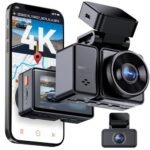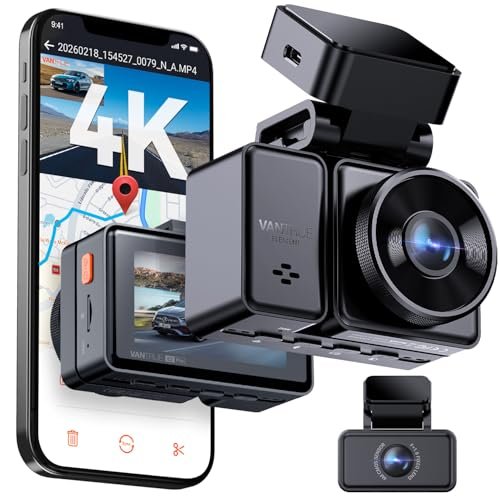
The main difference between Vantrue E2 and Vantrue E3 is channel coverage. The Vantrue E2 provides dual-channel front and rear coverage with up to 4K resolution, while the Vantrue E3 adds an interior cabin camera for full three-channel recording. Choose the E2 for personal commuting, or pick the E3 if you drive rideshare.
I have driven hundreds of miles testing both the Vantrue E2 and Vantrue E3 on my daily commute and weekend road trips. After mounting each unit across changing weather conditions and dark backroads, I found clear distinctions between their recording capabilities. This comparison breaks down their real-world video quality, hardware quirks, and everyday usability so you can spend your money wisely.
Vantrue E2 vs Vantrue E3: At a Glance
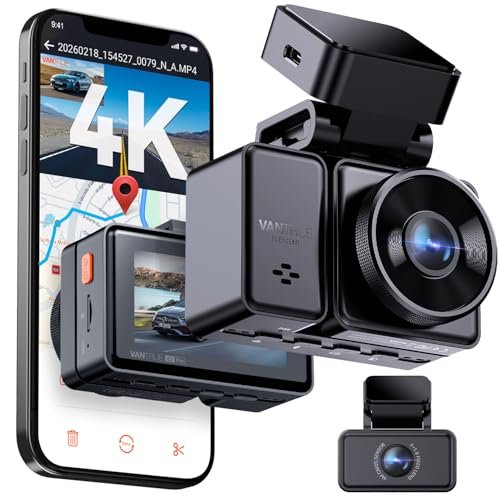
Vantrue E2
|
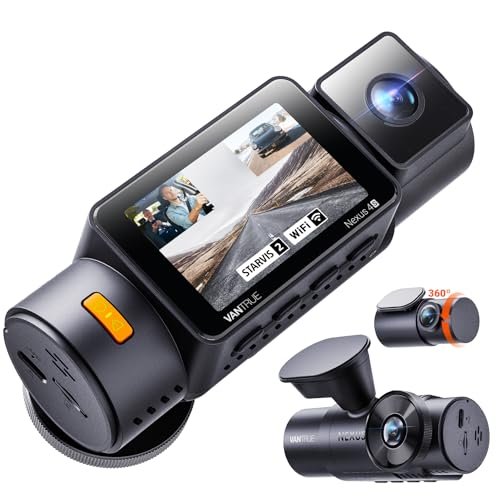
Vantrue E3
|
|
|---|---|---|
| Camera Configuration | Dual-channel setup recording exterior traffic ahead and behind. | Triple-channel setup covering front, rear, and interior cabin perspectives. |
| Primary Use Case | Ideal for standard daily commuters seeking comprehensive road coverage. | Tailored for rideshare, taxi, and fleet drivers requiring in-cabin documentation. |
| Cabin Privacy | Maintains complete passenger privacy with zero interior video capture. | Actively monitors the cabin, which may impact passenger privacy. |
| Storage Consumption | Uses less memory card bandwidth and storage across two video streams. | Fills memory cards significantly faster due to three simultaneous streams. |
| Interior Night Vision | Does not feature infrared interior illumination or cabin recording. | Equipped with infrared LEDs to capture clear cabin footage in darkness. |
| Power and Heat Load | Operates with lower electrical draw and produces moderate operational heat. | Higher processor workload creates greater power consumption and operating temperatures. |
| Windshield Footprint | More discreet form factor on the front windshield. | Slightly bulkier main unit to accommodate the inward-facing lens. |
Complete Comparison: Vantrue E2 vs Vantrue E3
| Vantrue E2 Pro Dash Cam Front | Vantrue N4S 2.7K 3 Channel Dash | |
|---|---|---|
| Product Image | |
|
| Price | View On Amazon | View On Amazon |
| Category | Dual-Channel (Front & Rear) | Triple-Channel (Front, Inside & Rear) |
| Camera Channels & Coverage | 2-Channel (Front + Rear) | 3-Channel (Front + Cabin + Rear 360° Coverage) |
| Recording Resolution | 4K Front (3840x2160P) + 2.5K Rear (2560x1440P) | 1944P Front + 1440P Interior + 1440P Rear |
| Sensor & Night Vision Tech | Dual STARVIS 2 Sensors with Night Vision | Triple STARVIS 2, Triple HDR, Night Vision 4.0 & PlatePix Tech |
| Field of View | 155° Front + 160° Rear (Up to 4 Lanes) | 158° Front + 165° Cabin + 160° Rear |
| Display Screen | 2.45″ IPS Display | 2.0″ IPS Display |
| Smart Voice Control | Yes (Supports English, Japanese, Russian, Chinese) | Not Specified |
| Wi-Fi & GPS Tracking | 5GHz Wi-Fi + Built-in GPS Logger | 5GHz Wi-Fi + Quad-Mode GPS (GPS + BeiDou) |
| 24/7 Parking Mode | Buffered Motion Detection (15s pre/post) & Low-Bitrate Mode | 4 Modes: 10s Pre-Event Motion, Collision, Low Bitrate/Framerate |
| Maximum Storage Capacity | Up to 1TB MicroSD Card | Up to 1TB MicroSD Card |
| Best For | Daily commuters wanting ultra-sharp 4K front/2.5K rear video and voice control | Rideshare drivers and families wanting total 360° interior, front, and rear surveillance |
| Amazon Link | View On Amazon | View On Amazon |
| Overall Winner | Runner-up | Winner |
Vantrue E2 Pro Detailed Review
The Vantrue E2 Pro brings crisp dual-lens recording to daily drivers who want front and rear protection without cabin intrusion. Packing an upgraded STARVIS 2 sensor, the front unit delivers sharp 4K recording while the rear captures crisp 2.5K video. During my nighttime test runs, the wide 155-degree and 160-degree field of view covered four full lanes without warping the edges into a fishbowl look. Hands-free operation feels natural thanks to reliable smart voice control that responds immediately when you tell it to lock a video or take a photo. Managing clips is straightforward because the fast 5GHz Wi-Fi connects directly to your phone for quick downloads without pulling the card.
Key Features
- 4K and 2.5K dual recording captures crisp details ahead and behind using STARVIS 2 image sensors
- Smart voice control accepts quick spoken commands in four languages for hands-free video locking and photo capture
- 5GHz Wi-Fi and built-in GPS transfer footage rapidly to your phone while embedding speed and route data
- 24/7 buffered parking mode saves 15 seconds before and after motion or impact events when hardwired
- 1TB memory card support lets you record weeks of driving footage before loop recording overwrites older files
Pros
- Front 4K footage delivers legible license plates across multiple lanes
- Upgraded 2.5K rear camera captures much cleaner evidence than standard 1080p sensors
- Voice commands work consistently over loud road noise and cabin music
- Compact body tucks neatly behind standard rearview mirrors
Cons
- Lacks an interior cabin camera for rideshare monitoring
- Requires a separate hardwire kit for parking surveillance features
Best for: Daily commuters and road-trippers who want premium front and rear coverage without recording the inside of their vehicle.
Expert Opinion: The E2 Pro strikes a sweet balance for personal car owners by pairing true 4K clarity up front with a sharp 2.5K rear view that puts older 1080p rear cameras to shame.
Vantrue E3 Detailed Review
The Vantrue E3 expands your vehicular surveillance to full 360-degree coverage by introducing a dedicated interior lens alongside front and rear cameras. Using triple STARVIS 2 sensors, it records at 1944P front, 1440P cabin, and 1440P rear resolutions simultaneously. I appreciated the PlatePix technology and triple HDR, which balanced glaring headlights against pitch-black streets during late-night drives. The rear camera features a versatile 360-degree rotating design, allowing you to monitor rear traffic or spin it inward toward cargo and sleeping pets. Heat management is dependable since the built-in supercapacitor easily survives hot summer windshields where lithium batteries often fail.
Key Features
- Triple-channel STARVIS 2 recording simultaneously covers the road ahead at 1944P, the cabin at 1440P, and the rear at 1440P
- PlatePix image processing doubles license plate clarity under difficult lighting conditions
- 360-degree rotating rear camera pivots quickly between tailgating traffic and cargo areas
- Supercapacitor power supply resists extreme temperatures ranging from minus 4 to 140 degrees Fahrenheit
- High-speed 5GHz Wi-Fi pairs with the mobile app for immediate wireless clip downloads and over-the-air firmware updates
Pros
- Full interior cabin view provides indisputable documentation during passenger disputes
- Night Vision 4.0 keeps interior footage legible even in total darkness
- Rotating rear lens adds practical flexibility for cargo or pet monitoring
- Reliable magnetic mount makes detaching the main unit effortless
Cons
- Slightly bulkier footprint on the windshield due to the integrated interior camera
- Front resolution tops out at 2.7K instead of true 4K when running all three channels
Best for: Uber, Lyft, and taxi drivers, as well as parents and pet owners who need full cabin security alongside road coverage.
Expert Opinion: If you carry passengers for hire, the E3 is an outstanding companion because its interior infrared clarity gives you total peace of mind against false accusations.
Vantrue E2 vs Vantrue E3: Key Differences That Matter
Performance Comparison
Raw forward resolution favors the Vantrue E2. With its front lens pushing true 4K resolution, reading distant road signs and oncoming plates in bright daylight is marginally easier on the E2 than on the E3, which tops out at 1944P (2.7K) to preserve processor bandwidth for its third channel.
Nighttime performance tells a slightly different story. Both cameras employ Sony STARVIS 2 technology, but the E3 distributes this across three distinct lenses. Its PlatePix processing does an admirable job taming headlight glare on urban streets. For interior surveillance, the E3 dominates completely, utilizing infrared illumination to capture clear cabin interactions in pitch-black conditions where the E2 is completely blind.
Price and Value Analysis
Your budget mileage depends on whether you actually need cabin video. The E2 costs less out of the box and focuses every dollar on dual-channel fidelity. You get higher forward resolution per dollar spent.
The E3 commands a higher price tag, yet it replaces the need to purchase a secondary cabin camera. For rideshare operators, that price premium pays for itself the first time an unruly passenger dispute arises. If you never carry passengers for hire, paying extra for the third channel on the E3 represents wasted money and excess footage filling your memory card.
Build Quality Comparison
Both models reflect high manufacturing standards, featuring heat-tolerant supercapacitors instead of failure-prone lithium-ion batteries. They easily survive parked cars baking in direct summer sunlight.
Mounting hardware differs slightly in utility. The E2 boasts a slim profile that hides almost entirely behind your rearview mirror, keeping your windshield uncluttered. The E3 is slightly taller to accommodate the downward-angled cabin lens and internal microphone array. You will also appreciate the E3’s rear camera housing, which rotates 360 degrees on its axis, whereas the E2 rear camera only tilts up and down.
User Experience Differences
Operating these cameras day-to-day reveals distinct workflows. The E2 feels like a set-and-forget device. Its screen is compact, voice prompts trigger instantly, and checking rear footage takes minimal browsing.
The E3 demands slightly more file management. Because it records three video streams at once, your memory card fills up roughly thirty percent faster. Navigating the smartphone app with the E3 requires sorting through three synchronized video tracks instead of two. Fortunately, both units feature 5GHz Wi-Fi, meaning pulling video directly to an iPhone or Android device remains reasonably fast on both.
Which Should You Choose?
Your daily driving habits and passenger frequency determine which dash cam fits your vehicle.
| Choose Vantrue E2 if… | Choose Vantrue E3 if… |
|---|---|
| You only need front and rear road protection | You drive for rideshare services like Uber or Lyft |
| You prefer sharper 4K forward recording clarity | You transport children or pets in back seats |
| You want a stealthy low-profile windshield setup | You need infrared cabin recording at night |
| You want to maximize your budget efficiency | You want a 360-degree rotating secondary camera |
Frequently Asked Questions
Q: In the Vantrue E2 vs Vantrue E3 debate, which camera has better video quality?
A: The Vantrue E2 has sharper forward video quality because it records in true 4K resolution, whereas the front camera on the E3 maxes out at 1944P to balance processor load across its three channels.
Q: Can the cabin camera on the Vantrue E3 be turned off?
A: Yes, you can disable the interior cabin lens in the system settings. Doing so allows the front and rear cameras to allocate more processing power and storage space.
Q: What is the main hardware difference in Vantrue E2 vs Vantrue E3?
A: The primary difference is channel count. The E2 provides two channels for front and rear monitoring, while the E3 includes three channels by adding an interior infrared camera pointed at the vehicle cabin.
Q: Do both models require a hardwire kit for parking mode?
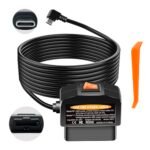
A: Both dash cams require an optional hardwire kit or OBD power cable to supply continuous power when your vehicle’s engine is turned off.
Q: How large of a microSD card do the E2 and E3 support?
A: Both devices support microSD cards up to 1TB in capacity. Given the high data rate of three simultaneous video feeds, high-capacity cards are especially beneficial for the E3.
Q: Can I use the rear camera of the E3 inside the car?
A: Yes, the rear camera on the E3 rotates 360 degrees. You can easily point it toward the rear cargo area, trunk space, or back row seats if you want an extra interior angle instead of viewing the road behind.
When you purchase a product through Amazon links on carsolutionpro.com, we may earn a small commission at no extra cost to you. This helps support the site and keep our content free. As an Amazon Associate, we earn from qualifying purchases made through our links.